
In the modern world, washing machines have become indispensable household appliances, streamlining the laundry process and saving us valuable time. Among the various brands available, Samsung stands out for its innovative technology and user-friendly features. However, like any appliance, Samsung washers can encounter issues that may disrupt their functionality. This is where error codes come into play. These codes serve as a diagnostic tool, alerting users to specific problems that may require attention. Understanding these error codes is crucial for maintaining the efficiency of your washing machine and ensuring that your laundry routine remains uninterrupted.
Samsung washer error codes are designed to provide insight into the machine’s performance and any potential malfunctions. Each code corresponds to a specific issue, ranging from minor glitches to more significant mechanical failures. By familiarizing yourself with these codes, you can take proactive steps to troubleshoot and resolve issues before they escalate. This knowledge not only empowers you as a user but also enhances the longevity of your appliance, ultimately saving you time and money on repairs.
Common Samsung Washer Error Codes and Their Meanings
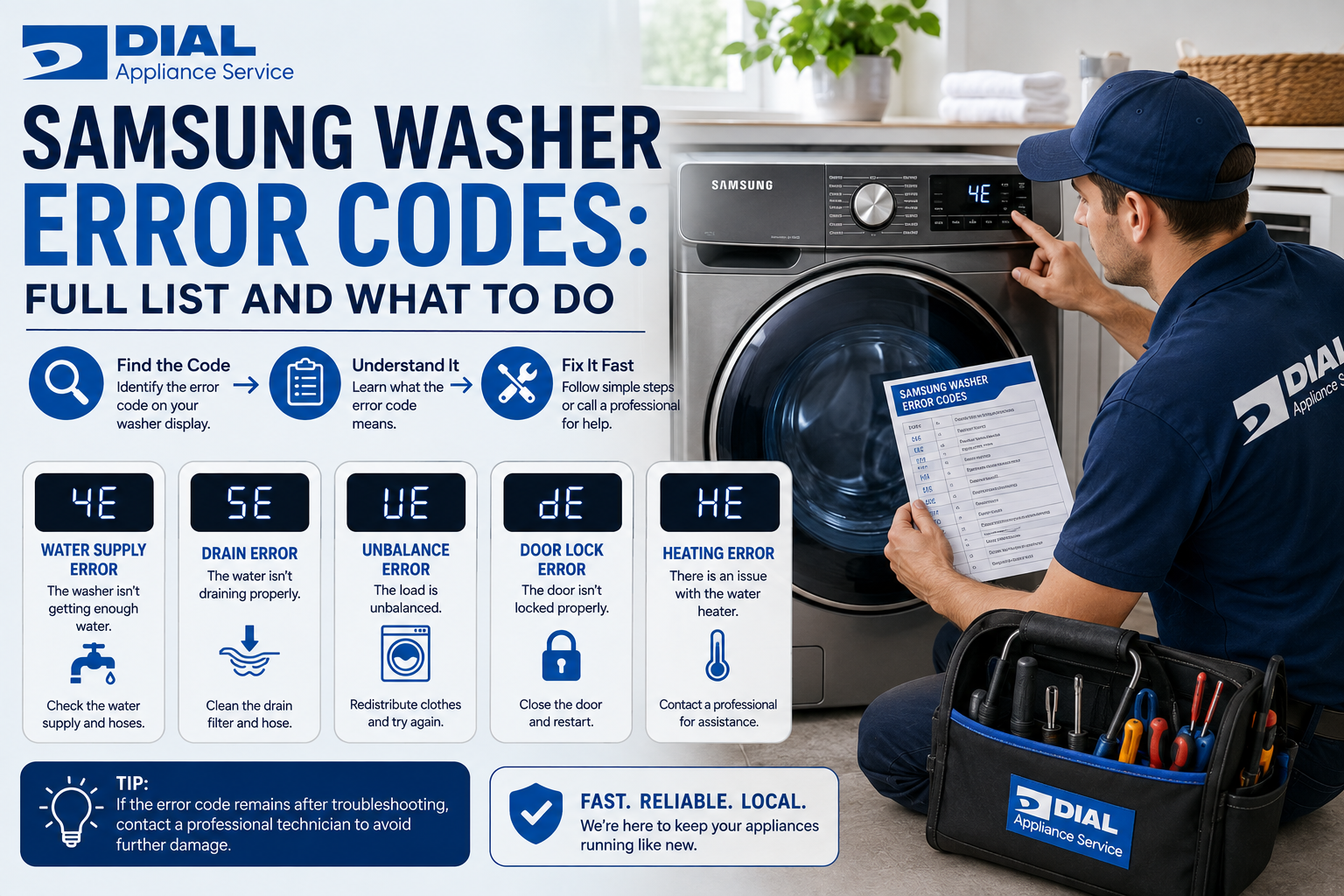
Samsung washers are equipped with a variety of error codes that indicate different issues. One of the most common codes is the “DC” error code, which signifies an unbalanced load. This occurs when the laundry is unevenly distributed within the drum, causing the washer to vibrate excessively during the spin cycle. Another prevalent code is “LE,” which indicates a motor issue, often related to a malfunctioning motor or wiring problem. Understanding these codes is essential for diagnosing problems quickly and effectively.
Other notable error codes include “UE,” which also points to an unbalanced load but may require additional troubleshooting steps, and “4C,” indicating a water supply issue. This code suggests that the washer is not receiving enough water, which could be due to a clogged filter or kinked hose. Each error code serves as a guide, helping users identify the root cause of their washing machine’s malfunction and take appropriate action.
How to Troubleshoot Samsung Washer Error Codes
When faced with an error code on your Samsung washer, the first step is to consult the user manual for guidance on what the specific code means. This manual typically provides a comprehensive list of error codes along with troubleshooting tips tailored to each issue. Once you have identified the error code, you can begin troubleshooting by following a systematic approach.
Start by checking the basics: ensure that the washer is plugged in and that there are no issues with the power supply. Next, inspect the water supply hoses for kinks or blockages that could impede water flow. If the error code indicates an unbalanced load, redistribute the laundry evenly within the drum and attempt to run a spin cycle again. By methodically addressing each potential issue, you can often resolve minor problems without needing professional assistance.
Step-by-Step Guide to Resolving Samsung Washer Error Codes
Resolving Samsung washer error codes can often be achieved through a series of straightforward steps. Begin by turning off the machine and unplugging it from the power source for safety. After waiting for a few minutes, plug it back in and restart the washer. This simple reset can sometimes clear temporary glitches that trigger error codes.
If the error persists, refer to the specific code you encountered. For instance, if you see the “DC” code indicating an unbalanced load, open the door and redistribute the laundry evenly within the drum. Ensure that heavy items are balanced with lighter ones to prevent further issues during the spin cycle. If you encounter a “4C” code indicating a water supply problem, check both ends of the water supply hoses for kinks or clogs and ensure that the water valves are fully open.
Understanding the Importance of Samsung Washer Error Codes
Understanding Samsung washer error codes is vital for several reasons. Firstly, these codes serve as an early warning system, alerting users to potential issues before they escalate into more significant problems. By addressing these errors promptly, you can prevent costly repairs and extend the lifespan of your appliance.
Moreover, being knowledgeable about error codes empowers users to take control of their laundry routines. Instead of waiting for a technician to diagnose an issue, you can troubleshoot minor problems independently, saving both time and money. This proactive approach not only enhances your understanding of your appliance but also fosters a sense of confidence in managing household tasks.
Tips for Preventing Samsung Washer Error Codes
Preventing Samsung washer error codes involves regular maintenance and mindful usage practices. One effective strategy is to avoid overloading your washer, as this can lead to unbalanced loads and trigger error codes like “DC” or “UE.” Always adhere to the manufacturer’s guidelines regarding load capacity to ensure optimal performance.
Additionally, regularly inspect and clean your washer’s filters and hoses to prevent clogs that could lead to water supply issues indicated by error codes like “4C.” It’s also advisable to run maintenance cycles periodically, using specialized cleaning products designed for washing machines. These practices not only help prevent error codes but also contribute to the overall efficiency and longevity of your appliance.
How to Reset Samsung Washer Error Codes
Resetting Samsung washer error codes is often a straightforward process that can resolve minor glitches. To reset your washer, start by turning off the machine and unplugging it from the power source. Wait for approximately five minutes before plugging it back in. This brief pause allows any residual power to dissipate and can help clear temporary errors.
Once you’ve plugged the washer back in, turn it on and select a cycle to see if the error code has cleared. If it persists, consult your user manual for specific reset instructions related to your model, as some models may have unique reset procedures that differ from others.
When to Call for Professional Help with Samsung Washer Error Codes
While many Samsung washer error codes can be resolved through troubleshooting and basic maintenance, there are instances when professional assistance is necessary. If you encounter persistent error codes that do not clear after following troubleshooting steps or if you notice unusual noises or leaks during operation, it’s time to call in an expert.
Professional technicians possess specialized knowledge and tools that enable them to diagnose complex issues accurately. They can address underlying problems that may not be immediately apparent to users, ensuring that your washing machine operates safely and efficiently. Additionally, if your appliance is still under warranty, seeking professional help may be essential to avoid voiding coverage.
The Impact of Samsung Washer Error Codes on Appliance Performance
Samsung washer error codes directly impact appliance performance by indicating underlying issues that may hinder functionality. When an error code appears, it often signifies that the machine cannot operate at its optimal level until the problem is resolved. For instance, an unbalanced load may prevent the washer from completing its spin cycle effectively, leading to damp clothes and extended drying times.
Moreover, ignoring error codes can lead to more severe mechanical failures over time. For example, a persistent “LE” code indicating motor issues could result in complete motor failure if left unaddressed. By paying attention to these codes and taking prompt action, users can maintain their appliance’s performance and avoid costly repairs down the line.
How Samsung Washer Error Codes Affect Laundry Routine
The presence of Samsung washer error codes can significantly disrupt your laundry routine. When an error code appears, it often halts the washing process entirely, leaving you with a load of dirty laundry that cannot be cleaned until the issue is resolved. This interruption can lead to delays in completing household chores and may even affect your schedule if you rely on clean clothes for work or other commitments.
Additionally, frequent encounters with error codes can create frustration and stress for users who depend on their washing machines for daily tasks. Understanding how these codes work and how to troubleshoot them can alleviate some of this stress, allowing you to manage your laundry routine more effectively.
Conclusion and Final Thoughts on Samsung Washer Error Codes
In conclusion, understanding Samsung washer error codes is essential for maintaining your appliance’s efficiency and ensuring a smooth laundry experience. By familiarizing yourself with common error codes and their meanings, you empower yourself to troubleshoot issues effectively and take proactive measures to prevent future problems.
Regular maintenance practices and mindful usage can significantly reduce the likelihood of encountering error codes in the first place. However, when issues arise that cannot be resolved through basic troubleshooting, seeking professional help is crucial for ensuring your washing machine operates safely and efficiently.
Ultimately, being informed about Samsung washer error codes not only enhances your understanding of your appliance but also contributes to a more seamless laundry routine in your home. With this knowledge at hand, you can tackle any challenges that arise with confidence and ease.
Contact Dial Appliance Service today to schedule your appointment and experience why we’re New York City’s most trusted choice for “Appliance Repair.” Schedule Your Appliance Repair Service Now at (718) 368-1512 or Contact Us Now!